Bank Connection
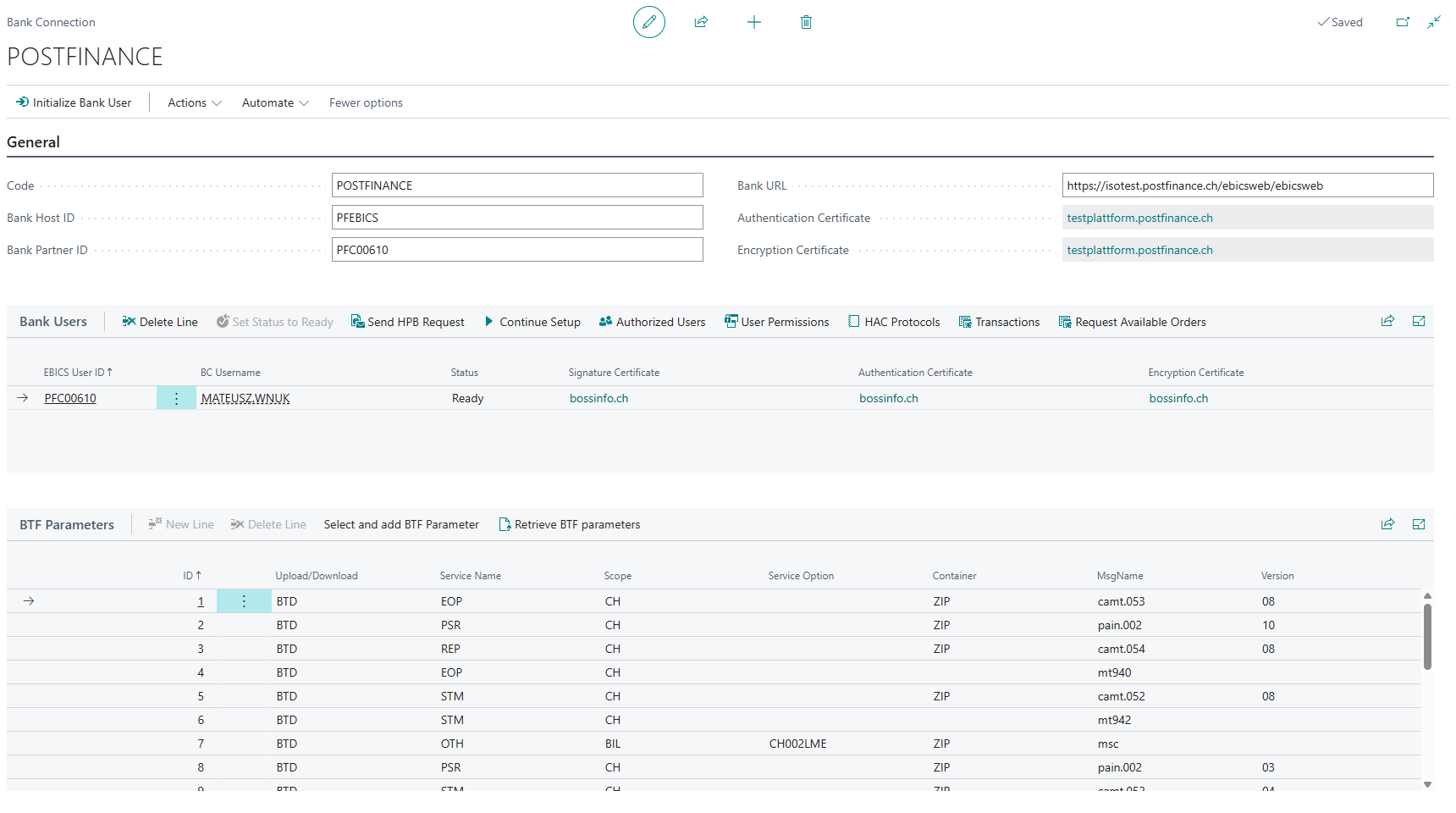
The Bank Connection page is the central configuration point for an EBICS bank connection. Each record represents connection to a bank and holds the EBICS credentials, the associated bank users, and the BTF parameters that define which order types are available.

General
The General group contains the EBICS connection parameters provided by the bank.
| Field | Description |
|---|---|
| Code | A unique identifier for this bank connection. Used internally to link bank users, BTF parameters, and certificates to this bank connection. |
| Bank Host ID | The EBICS Host ID of the bank server. Provided by the bank. Identifies the bank. |
| Bank Partner ID | The EBICS Partner ID (also called Customer ID) assigned to your organisation by the bank. Mandatory. |
| Bank URL | The HTTPS endpoint (URL) of the bank's EBICS server. All EBICS requests are sent to this address. |
| Authentication Certificate | Displays the name of the bank-configuration authentication certificate stored for this connection. Click the value to open the certificate record. This certificate is fetched from the bank during initialisation (HPB request) and is used to verify signed responses from the bank. |
| Encryption Certificate | Displays the name of the bank-configuration encryption certificate stored for this connection. Click the value to open the certificate record. This certificate is fetched from the bank during initialisation (HPB request) and is used to encrypt transactions sent to the bank. |
Information
The Authentication Certificate and Encryption Certificate fields are read-only. They are populated automatically when you run the HPB request during bank user initialisation.
Page Actions
| Action | Description |
|---|---|
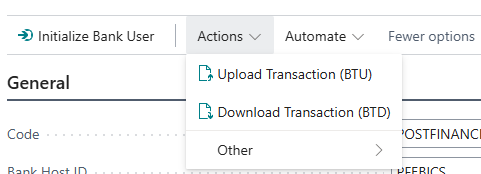
| Initialize Bank User | Opens the bank user initialisation wizard. Use this to set up a new EBICS user for this bank connection - generates the user's key pairs, creates the INI and HIA letters, and guides through submission to the bank. |
| Upload Transaction (BTU) | (Sandbox only) Manually uploads a file to the bank using a selected bank user and BTF parameter. Intended for testing upload orders in a sandbox environment. |
| Download Transaction (BTD) | (Sandbox only) Manually triggers a download from the bank using a selected bank user and BTF parameter. Intended for testing download orders in a sandbox environment. |
Bank Users
The Bank Users subpage lists the EBICS users configured for this bank connection. Each row represents one EBICS User. A single Business Central user account can have one EBICS user per bank connection.

Fields
| Field | Description |
|---|---|
| EBICS User ID | The EBICS User ID assigned to this user by the bank. Together with the Partner ID and Host ID, it uniquely identifies the user on the bank's EBICS server. |
| BC Username | The Business Central user account linked to this EBICS user. Communication with bank runs under this identity. |
| Status | The current lifecycle state of the EBICS user. See User Status below. |
| Signature Certificate | Displays the name of the user's signature certificate. Click to open the certificate record. Used to sign payment orders sent to the bank. |
| Authentication Certificate | Displays the name of the user's authentication certificate. Click to open the certificate record. Used to authenticate EBICS requests. |
| Encryption Certificate | Displays the name of the user's encryption certificate. Click to open the certificate record. Used to decrypt EBICS responses. |
User Status
| Status | Meaning |
|---|---|
| New | The user has been created but the initialisation process (INI/HIA letters) has not been completed. |
| Initialised | The INI and HIA orders have been submitted to the bank. Waiting for bank activation. |
| Ready | The bank has activated the user. EBICS orders can be submitted. |
Actions

| Action | Description |
|---|---|
| Set Status to Ready | Marks the user as Ready. Also automatically fetches bank certificates (HPB), retrieves subscriber permissions (HTD), and retrieves BTF parameters (HKD). Use this after the bank confirms the user has been activated. |
| Send HPB Request | Fetches the bank's public authentication and encryption certificates from the EBICS server and stores them for this connection. Run this if the bank renews its certificates. |
| Continue Setup | Reopens the bank user initialisation wizard to resume an incomplete setup, for example if the INI or HIA step was not yet submitted. |
| Authorized Users | Opens the list of Business Central users who are permitted to submit EBICS orders on behalf of this EBICS user. Use this to grant colleagues access without creating additional EBICS user identities at the bank. |
| User Permissions | Displays the EBICS order type permissions granted to this user by the bank, as returned by the HTD order. Read-only. |
| HAC Protocols | Opens the HAC protocol entries for this user. HAC (HAC = EBICS order type) contains the bank's processing acknowledgements for submitted orders - status confirmations, rejections, and technical returns. |
| Transactions | Opens the transaction log for this user, showing all EBICS upload and download operations with their status and timestamps. |
| Request Available Orders | (Sandbox only) Sends an administrative request to the bank server and displays the raw list of available order types. Currently available only on Sandbox environments. |
BTF Parameters
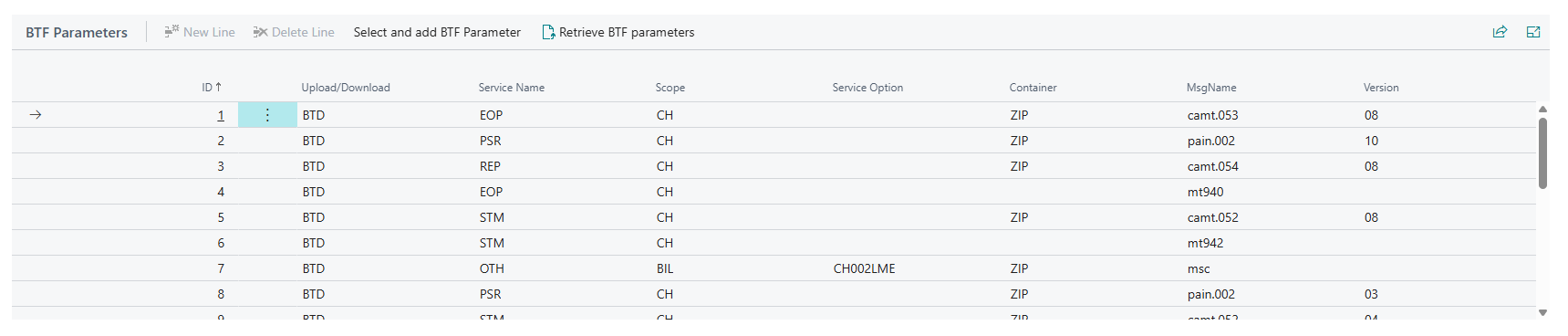
The BTF Parameters subpage lists the Business Transaction Format (BTF) parameters configured for this bank connection. BTF parameters define the specific order types available - for example, pain.001 credit transfers (upload) or camt.053 bank statements (download).
BTF parameters are populated either by retrieving them from the bank (HKD order) or by manually selecting from the global BTF catalogue.
Fields
| Field | Description |
|---|---|
| ID | Internal identifier for this BTF parameter entry. |
| Upload/Download | Indicates whether this parameter is for an upload order (BTU - sending files to the bank) or a download order (BTD - receiving files from the bank). |
| Service Name | Three-character EBICS service name code identifying the business service (for example, SDD for SEPA Direct Debit). |
| Scope | Three-character scope code qualifying the service (for example, CH for Switzerland). |
| Service Option | Optional qualifier for the service. Differentiates variants within the same service name. |
| Container | Container format code (for example, XML). Defines the envelope format of the payload. |
| MsgName | The message name within the container (for example, pain.001). Identifies the specific ISO 20022 message type. |
| Version | Version identifier of the message format. |
Actions

| Action | Description |
|---|---|
| Select and add BTF Parameter | Opens the global BTF Parameters catalogue and lets you select one or more standard parameters to add to this bank connection. If a parameter with the same ID already exists, you are asked whether to overwrite it. |
| Retrieve BTF parameters | Sends an HKD order to the bank and automatically imports all BTF parameters the bank reports as available for the current user. This is the recommended way to populate BTF parameters after a user reaches Ready status. |
Related pages
- Certificates - view and manage the cryptographic certificates associated with this bank connection and its users.
- Authorized Users - manage which Business Central users can submit orders on behalf of an EBICS user.
- User Permissions - view the EBICS order type permissions granted to a user by the bank.
- Transactions - full transaction log for all EBICS upload and download operations.
- HAC Protocols - bank processing acknowledgements for submitted orders.
- BTF Parameters - the global BTF parameter catalogue used as the source when adding parameters to a bank connection.