Transactions
The Transactions page is the central log of all EBICS upload (BTU) and download (BTD) operations. Every EBICS order - whether initiated manually or triggered by a payment process - creates a transaction entry. The log is read-only.
Transactions List
The list shows all EBICS transactions, sorted by entry number descending so the most recent entries appear first.

| Field | Description |
|---|---|
| Entry No. | Sequential entry number assigned when the transaction was created. |
| Status | The current EBICS status of the transaction. Reflects the last known state returned by the bank. When documents related to this transaction are imported into the journals or posted, this is also reflected in the status. |
| Created At | Timestamp when the transaction was initiated. |
| Bank Code | The bank connection used for this transaction. |
| EBICS UserID | The EBICS user who submitted the transaction. |
| Admin Order Type | The EBICS order direction: BTU (upload - sending data to the bank) or BTD (download - retrieving data from the bank). |
| Service Name | The EBICS service name code identifying the business service (for example, SDD for SEPA Direct Debit). |
| Message Name | The ISO 20022 message name of the payload (for example, pain.001). |
| Order ID | The order ID assigned by the bank. Populated for BTU transactions after the bank accepts the order. |
| Transaction ID | The EBICS transaction ID assigned by the bank for the current protocol session. |
| BC Username | The Business Central user who initiated the transaction. |
| HAC Protocol | Indicates whether a HAC protocol acknowledgement has been received from the bank for this transaction. |
Transaction
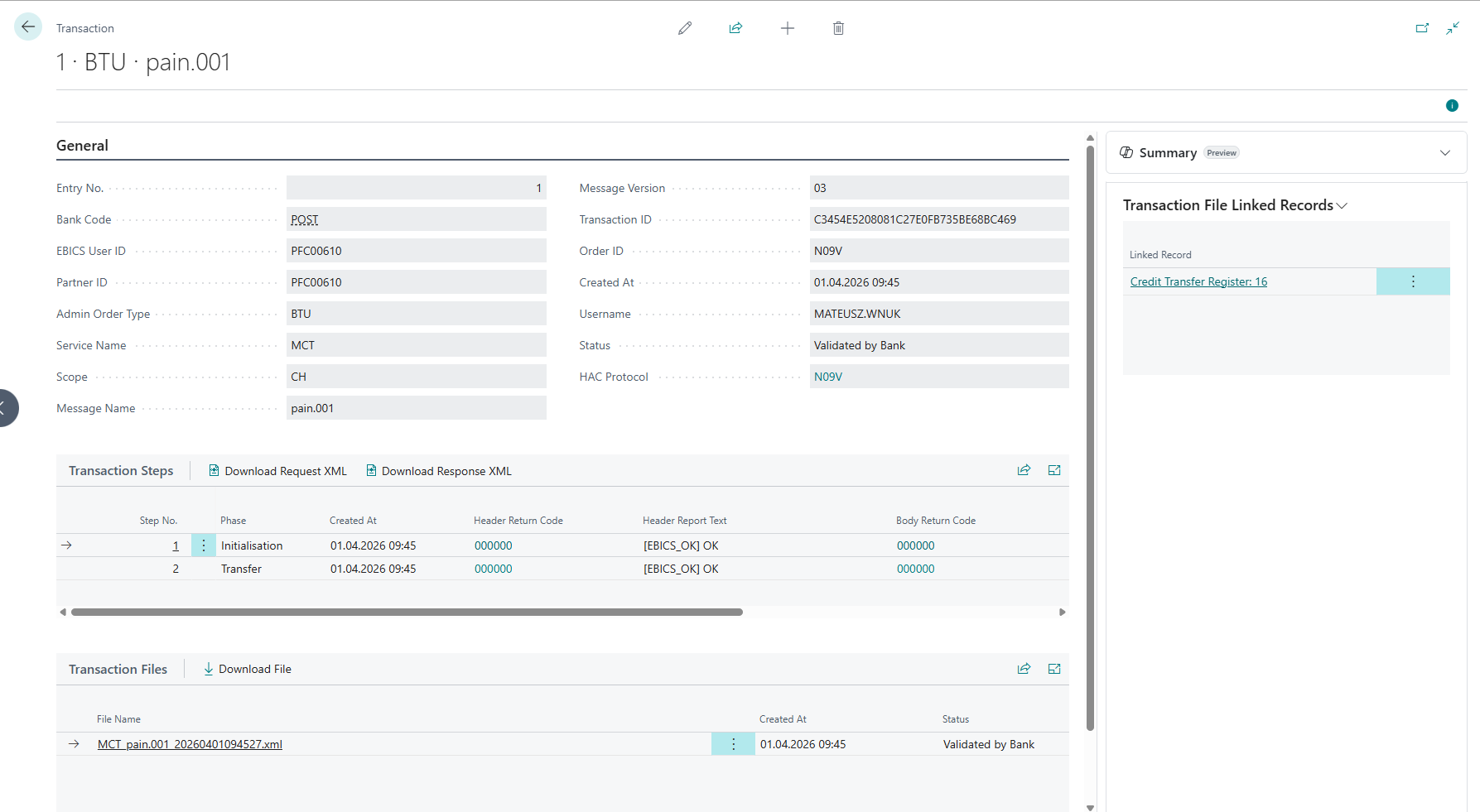
The Transaction card shows the full detail of a single transaction, including the EBICS transaction steps and any files transmitted. Open it by selecting a row in the Transactions list.
Transaction Steps
The Transaction Steps subpage shows each individual EBICS step executed for this transaction. A single transaction typically consists of an Initialisation step, one or more Transfer steps, and a Receipt step.

| Field | Description |
|---|---|
| Step No. | Sequential step number within the transaction. |
| Phase | The EBICS protocol phase: Initialisation, Transfer, or Receipt. |
| Created At | Timestamp of this step. |
| Header Return Code | The EBICS return code from the response header. Click the assist-edit button to look up the return code description. |
| Header Report Text | The report text from the response header. |
| Body Return Code | The EBICS return code from the response body. Click the assist-edit button to look up the return code description. |
| Body Report Text | The report text from the response body. |
Transaction Step Actions
| Action | Description |
|---|---|
| Download Request XML | Downloads the raw EBICS XML request sent to the bank for this step. Useful for diagnosing communication issues. |
| Download Response XML | Downloads the raw EBICS XML response received from the bank for this step. |
Transaction Files
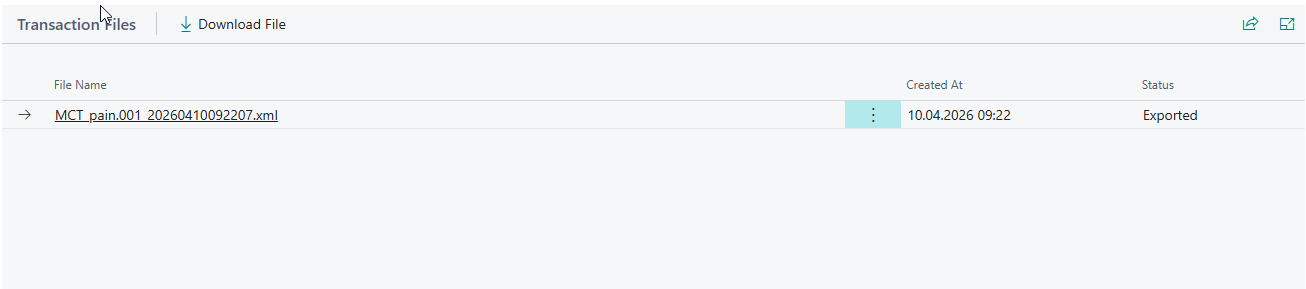
The Transaction Files subpage lists the payload files associated with this transaction - the uploaded file for BTU transactions or the downloaded file(s) for BTD transactions.
| Field | Description |
|---|---|
| File Name | The name of the transmitted file. |
| Created At | Timestamp when the file was stored. |
| Status | The current processing status of the file. |
Transaction File Actions
| Action | Description |
|---|---|
| Download File | Downloads the file content to your local machine. |
Status Reference
Transaction Status
The transaction-level Status field is computed automatically from the statuses of all files belonging to the transaction. It reflects the overall state of the operation.
| Status | Description |
|---|---|
| Exported | The file has been uploaded to the bank and is awaiting processing or bank confirmation. |
| Export Failed | The upload to the bank failed due to an EBICS communication or processing error. Requires investigation and retry. |
| Validated by Bank | The bank has confirmed successful processing of the uploaded file via a HAC acknowledgement (ORDER_HAC_FINAL_POS). Final success state for upload transactions. |
| Rejected by Bank | The bank has rejected the uploaded file via a HAC acknowledgement (ORDER_HAC_FINAL_NEG). Terminal failure - the payment was not accepted by the bank. |
| Downloaded | Files have been successfully downloaded from the bank but have not yet been processed. Initial state for download (BTD) transactions. |
| Transferred to Journal | Downloaded bank statement files have been imported and their content transferred into journal. |
| Skipped | Downloaded files were processed but contained no usable data and produced no import records. Not an error - the file was examined and found to have no actionable content. |
| Partially Transferred | Some files in a multi-file download have been transferred to the journal while others remain in an earlier state. |
| Posted | All exported files have been fully posted. |
| Partially Posted | Some files in a multi-file export have been posted while others have not yet been posted. |
File Status
Each file within a transaction has its own Status field tracking its individual lifecycle stage.
| Status | Description |
|---|---|
| Downloaded | The file was successfully downloaded from the bank. No further processing has occurred yet. |
| Exported | The file has been uploaded to the bank. Awaiting bank confirmation (HAC). |
| Export Failed | The upload to the bank failed. Check the transaction steps for the EBICS error codes. |
| Validated by Bank | The bank confirmed successful processing via HAC (ORDER_HAC_FINAL_POS). |
| Rejected by Bank | The bank rejected the file via HAC (ORDER_HAC_FINAL_NEG). |
| Transferred to Journal | The file's content has been imported into the bank reconciliation journal. |
| Skipped | The file was processed during import but produced no bank reconciliation lines (empty, already imported/posted or unrecognised content). |
| Posted | The associated records have been posted. |
Related pages
- HAC Protocols - bank acknowledgements referencing these transactions.