

Mehrere bossERP-Server auf der gleichen Maschine
Mit der Lancierung des v11.5-Servers von 4D
sind Aenderungen in den TCP-Ports vorzunehmen, falls mehrere bossERP-Server
auf derselben Maschine im Einsatz stehen.
Wir stützen uns auf folgende Release-Notes
von 4D v11.5 SQL:
The new version of 4D Server now uses three
TCP ports for the communications between the internal servers and the
clients:
- SQL Server:
19812 by default (can be modified on the “SQL/Configuration”
page of the Preferences). - Application
server: 19813 by default (can be modified on the “Client-Server/Configuration”
page of the Preferences). - DB4D server
(database server): 19814 by default. This port number cannot be modified
directly but it always consists of the application server port number
When a 4D client connects to 4D Server, it
contacts the TCP port of the application server (19813 or port indicated
after ‘:’ in the IP address indicated in the connection dialog box). The
connection to other servers via their respective ports is then automatic;
it is not necessary to specify them individually.
In the case of access via a router or a firewall,
the three TCP ports must be opened explicitly.
Demnach sind folgende Einstellungen vorzunehmen:
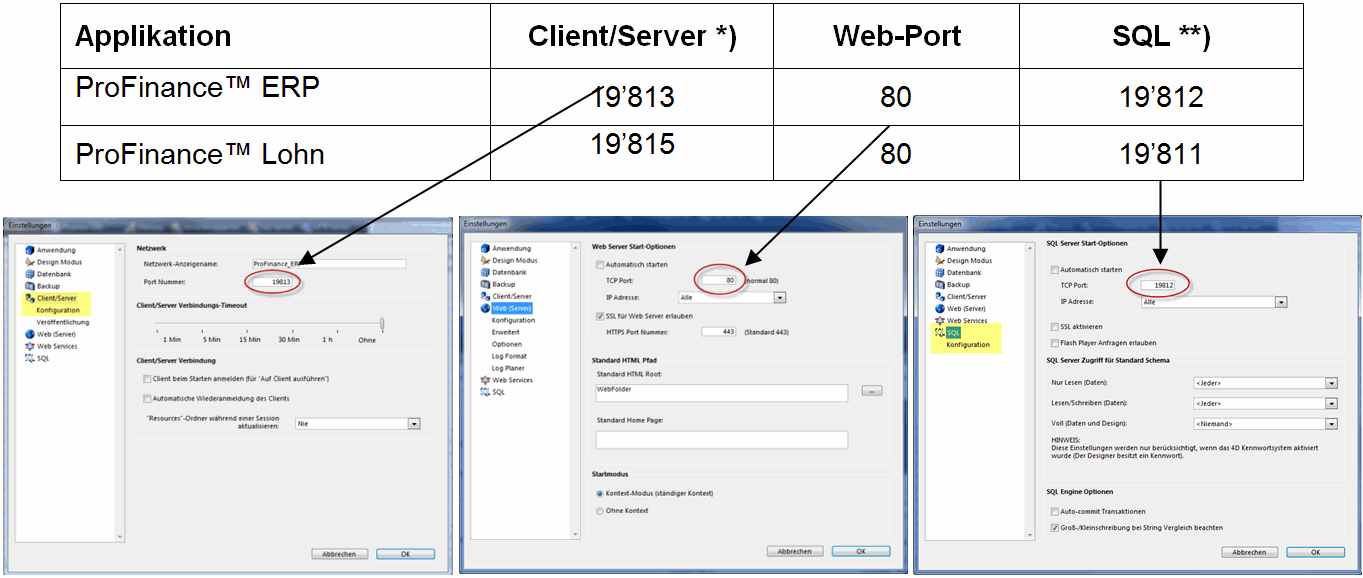 *) Wenn 2 Server oder mehr im Einsatz sind,
müssen die Port-Nummern des Servers 2 Ziffern Differenz haben, weil im
Hintergrund für jeden Server ein zusätzlicher, nicht beeinflussbarer Port
(um 1 höher) belegt wird.
**) Empfehlung: hier je 1 Nummer absteigend.
Dann kommt man andern Ports nicht in die Quere.
Nach den vorgenommenen Einstellungen müssen
die bossERP Server neu gestartet werden.